Vallox 121 SE

Vallox 121 SE

Production ended on 31.08.2023
The Manufacturing of the ventilation unit Vallox 121 has ended.

See model Vallox 125 MV. It replaces old MUH Ilmava units and Vallox 121 units. The replacement is very easy as there is no need for duct system modifications.

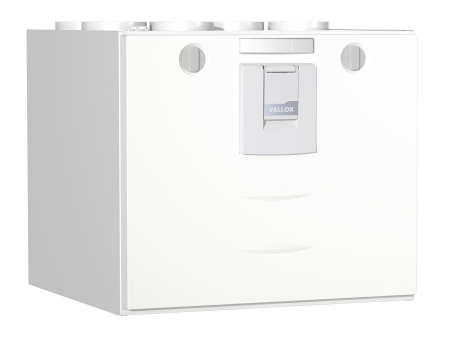
Suited for small and medium-sized homes, the popular Vallox 121 SE ventilation unit is equipped with the Vallox Digit SED control panel.

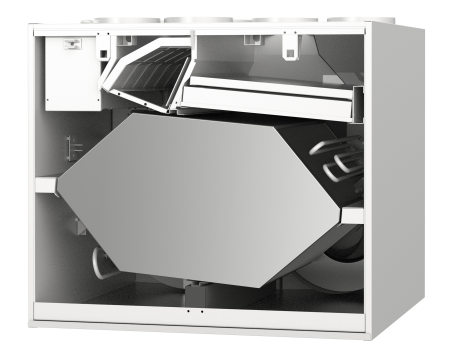
Control of the Vallox 121 SE ventilation unit can be automated with the optional humidity and carbon dioxide sensors and the week clock on the control panel. The summer/winter automation of the energy-efficient unit automatically bypasses the heat recovery cell during the hot summer months. The annual efficiency of the unit is 74%.

The ventilation unit is controlled with the control panel delivered with the unit.
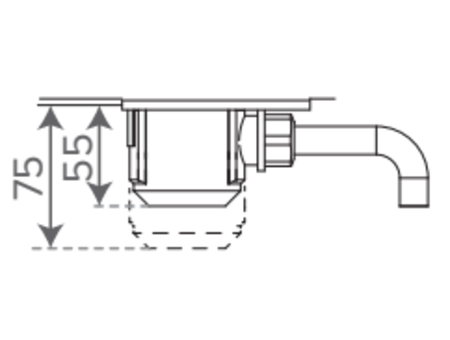
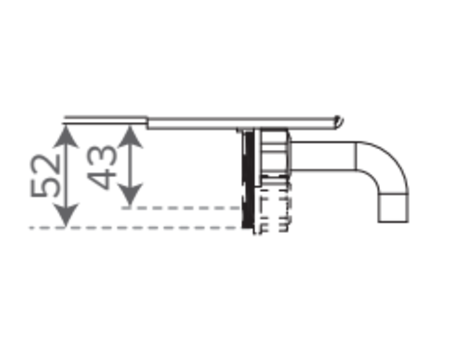
Including accessories: Vallox Digit SED control panel, condensing water seal Vallox SilentKlick, wall mounting plate.

Category:
Maximum recommended living area 152 m²
Annual efficiency (%) 74
Temperature efficiency of heat recovery (%) 79
SEC average climate -32.025 kWh/m²a
Reference airflow rate 0.064 m³/s
Specific power input (SPI) 0.36 W/(m³/h)
Specific Fan Power (SFP) 1.296 kW/(m³/s)
Maximum extract airflow @ 100 Pa 98 l/s
Maximum supply airflow @ 100 Pa 96 l/s
Maximum supply airflow EcoDesign 329 m³/h
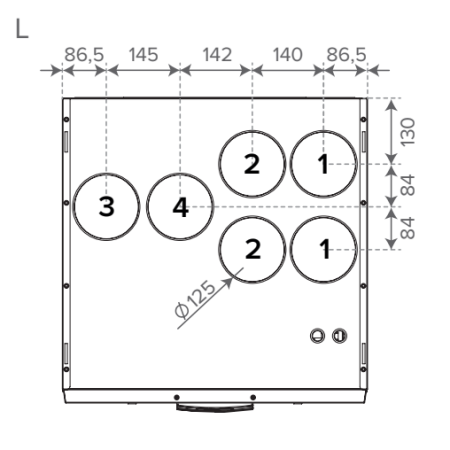
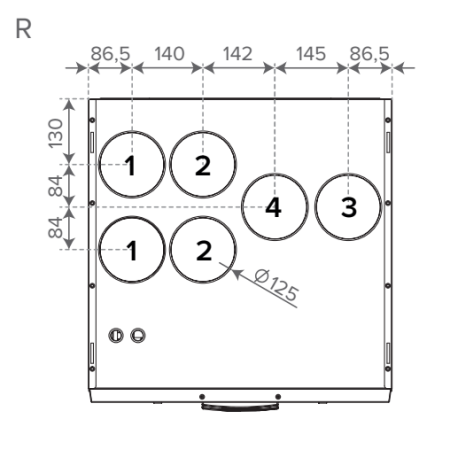
Duct outlets pcs 6
Duct outlet mm 125 mm
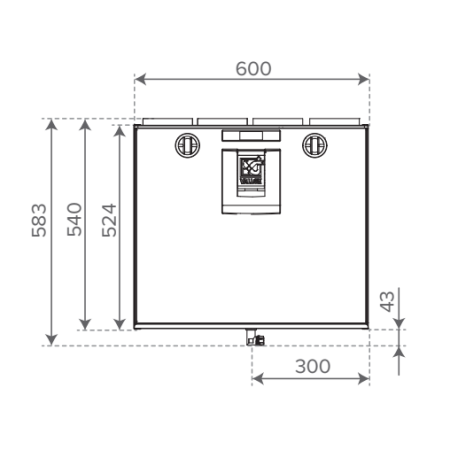
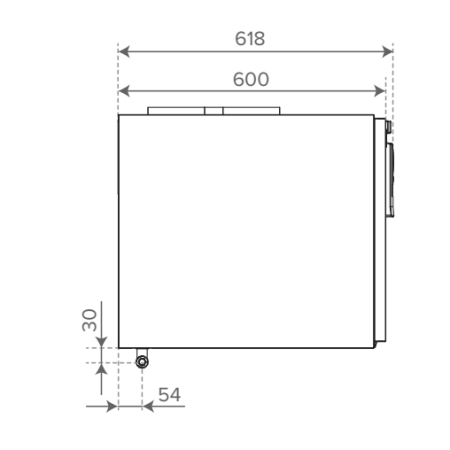
Product depth mm 618
Product width mm 600
Product height mm 540
Product weight 61 kg
Package weight 62 kg
ETIM EF003701 electrical connection Connection cable with protective earthed plug
Mounting place Wall
Remote monitoring options External voltage message 0-10 VDC
Bus control KNX converter (optional)
Extract air fan power consumption 0.117 kW
Supply air fan power consumption 0.117 kW
Sound power level 46 dB
Cell type Cross-counter flow cell
Cell Aluminium
HRU cell bypass Automatic heat recovery bypass
Defrosting method MC defrosting automatics with supply air fan stop
Post-heating Electrical resistor, 900 W

What should be considered when choosing the right ventilation unit model?

  1. Airflow capacity: Choose a ventilation unit with airflow rates that match the size of your home and its ventilation requirements. 
  2. Energy efficiency: Select a ventilation unit with a high heat recovery efficiency. 
  3. Versatile control options: Make sure the ventilation unit can be controlled in the way that suits you best, such as with a wall-mounted control panel, a kitchen cooker hood, remotely via your mobile device, or integrated into a home automation system. 
  4. Automation: Ensure that the unit includes advanced defrosting automation and built-in indoor air quality sensors. 
  5. Noise level: Choose a ventilation unit that operates as quietly as possible, especially if it will be installed in the kitchen, bathroom, utility room, or walk-in closet. 
  6. Filter availability: Make sure that compatible replacement filters are readily available. Original manufacturer filters are generally the best option. 
  7. Serviceability and durability: Consider how easy the unit is to maintain and clean, so that its performance and cleanliness can be preserved over the long term. 

All Vallox ventilation units meet the above requirements and features. 

How do I know which Vallox 125 CFi model is suitable to replace my old unit?

The different Vallox 125 CFi models have duct outlet configurations that match many older ventilation unit models, or they require only minor ductwork modifications. The letter in the unit name (A-H) indicates the model type, meaning the arrangement and location of the duct outlets.

In addition, you must verify the unit’s handedness (left-hand or right-hand version), which determines the orientation of the duct outlets in the top section of the unit.

The appropriate replacement model for an existing unit can be checked using the compatibility table (PDF).

For example, the 125A model has the same duct outlet layout as the MUH Ilmava 100, MUH Ilmava 120, and Vallox 121 SE/MC units. These models can therefore be replaced directly with a Vallox 125 CFi unit without any ductwork modifications.

How does the constant airflow feature work?

A standard ventilation unit adjusts the fan speed but cannot compensate for airflow changes caused by factors such as a window being left open temporarily or reduced airflow due to dirty filters.

A MyVallox ventilation unit equipped with the constant airflow feature maintains balanced airflow under all conditions by compensating for pressure differences caused by external factors.

For example, when a filter becomes dirty, the unit automatically increases airflow in the direction of the clogged filter to compensate for the increased resistance, thereby maintaining balanced supply and exhaust air volumes.

What do the abbreviations CFi, MV, MC, SE, K, VKL, R, and L mean?

The abbreviations CFi, MV, MC, and SE that appear after the product name of a Vallox ventilation unit refer to the unit’s control system or operating method.

  • CFi: The letters CF stand for Constant Flow, meaning the unit maintains constant airflow. The “i” stands for Intelligent, referring to the smart total-airflow control that makes commissioning and setup easier than before.
  • MV, MC, and SE: These abbreviations indicate the unit’s control system:
    • MV = MyVallox Control
    • MC = Simple Control
    • SE = Controlled with a Vallox Digit SED controller
  • K: Indicates a ventilation unit with an integrated cooker hood.
  • VKL: Refers to a model equipped with a water-based post-heating coil.
  • R and L: These letters indicate the unit’s handedness (orientation).
    • R (Right-hand model): Outdoor air enters the unit from the right side of the center line.
    • L (Left-hand model): Outdoor air enters the unit from the left side of the center line.

The locations of the other duct connections are correspondingly mirrored from one side to the other.

What is the difference between AC and EC fans?

An AC fan (alternating current fan) operates using traditional alternating current (AC), and its control is typically based on voltage or frequency adjustment. AC fans have been widely used for many years, but their energy efficiency and control capabilities are relatively limited.

An EC fan (electronically commutated fan) is a modern direct current (DC) fan with built-in electronic controls. EC fans are more energy-efficient, quieter, and allow precise speed control, for example through percentage-based adjustment via Vallox control systems. EC fans also enable more accurate balancing of supply and exhaust airflow rates while reducing electricity consumption.

Vallox MV and MyVallox CFi ventilation units use EC fans because they meet modern energy-efficiency requirements and provide versatile control options.

What additional sensors can be used with MyVallox ventilation units?

MyVallox ventilation units always come with built-in humidity and carbon dioxide (CO₂) sensors.

As optional accessories, they can also be connected to room-mounted humidity, CO₂, and VOC sensors.

  • Humidity sensors monitor indoor moisture levels and help the unit adjust ventilation automatically.
  • CO₂ sensors measure carbon dioxide levels, enabling demand-based ventilation according to occupancy.
  • VOC sensors detect volatile organic compounds and other indoor air pollutants, allowing the ventilation system to respond to changes in air quality.

How can Vallox MyVallox ventilation units be connected to a Modbus network?

Vallox MyVallox ventilation units can be connected directly to a Modbus network without the need for a separate adapter. Modbus functionality is built into MyVallox ventilation units as a standard feature.

The Modbus register documentation can be found here.

How can MyVallox ventilation units be connected to a KNX smart home system?

MyVallox MV ventilation units can be connected to a KNX smart home system using a KNX bus converter, which is available as an optional accessory.

The KNX bus converter enables communication between the MyVallox ventilation unit and the KNX automation system, allowing ventilation functions to be monitored and controlled through the KNX network.

Can MyVallox ventilation units be equipped with a cooling or preheating coil connected to a ground-source heat pump system?

A coil connected to the ground-source heat pump collector loop is not available as a built-in option in Vallox ventilation units. However, a MLV duct radiator can be connected to the ventilation system.

The MyVallox unit’s automation system can provide control signals for the pump and solenoid valve of the cooling or preheating circuit. This allows the MLV duct radiator to be used for:

  • Preheating incoming outdoor air during cold weather
  • Cooling supply air during warmer periods

How do you connect a MyVallox ventilation unit to the internet?

The ventilation unit is equipped with a LAN cable, which is connected directly to the router. The ventilation unit does not have a built-in wireless Wi-Fi connection.

If it is not possible to connect the ventilation unit to the router using a cable, a Wi-Fi repeater (Wi-Fi extender) can be installed near the unit. In that case, the ventilation unit’s LAN cable is connected to the Wi-Fi repeater, which is connected wirelessly to the home’s Wi-Fi network.

How can a MyVallox unit be controlled remotely?

MyVallox units, meaning MV and CFi models, can be registered to the browser-based MyVallox Cloud service using an internet connection. Through this service, the units can be controlled over the internet using a computer, tablet, or smartphone. Registration to the service is free of charge.

With a remote connection, all the same functions can be controlled as with the local control panel. Instructions for registering the unit can be found in the device manual and in Vallox WebHelp 

If desired, the unit can also be controlled by connecting it to a building automation system or by connecting it to the home network, allowing it to be controlled through the MyVallox Home service using a device connected to the same home network.

Vallox does not provide a separate application for controlling the ventilation unit.

Can MyVallox ventilation units compensate for the negative pressure caused by a cooker hood or central vacuum system?

Partly, yes.

The exhaust airflow of a cooker hood or central vacuum system can be greater than the total ventilation airflow of the entire dwelling, so it may not always be possible to fully compensate for it with a ventilation unit, unless the unit is equipped with the constant airflow feature. With a CFi unit, negative pressure should not occur.

Compensation with MyVallox MV-units requires a contact output (switching contacts) from the cooker hood, central vacuum cleaner or a pressure difference switch connected to them. The control voltage received from the MV unit is brought through these contacts back to the digital input. At the controller of the MyVallox unit, choose Self-programmed input as the setting for this digital input. After that, choose the desired power for the supply and extract fans in the self-programmed input settings.

What types of controllers can I get for my MyVallox ventilation unit?

MyVallox CFi and MV ventilation units can be controlled with the MyVallox Control controller supplied with the unit, which is based on separate modes, such as Home and Automatic mode, selected by the user. The unit can also be controlled with the newer MyVallox Touch controller, either in parallel or on its own. The Touch controller includes Home, Away, Automatic, Boost and Custom modes, and it can be recessed into the cover plate of certain switch systems. CFi and MV models can also be controlled with a cooker hood and can be connected to a building automation system for remote control, for example via a smartphone (KNX, Modbus, voltage signal). The units can also be connected to the free browser-based MyVallox Cloud service. Of these different control options available for the units, the option best suited to the property and lifestyle can be selected.

MC model ventilation units can be controlled with the separately sold four-speed, easy-to-use Simple Control controller, the Vallox ProControl controller, or a cooker hood. The Vallox ProControl controller has three mode selections (Home, Away and Boost). MC models can also be controlled via a 0-10 V voltage signal. MC models equipped with a ProControl controller can be connected to a Modbus network.

SE refers to a ventilation unit that can be controlled with the Vallox Digit SED controller supplied with the unit. The controller features eight-step speed control. Humidity and carbon dioxide sensors are available as optional accessories for SE models.

Why should I replace my ventilation unit?

It is worth replacing your ventilation unit because the heat recovery core in older ventilation units is often significantly smaller than that of today’s energy-efficient devices. In addition, the fans in new units often consume less electricity than those in older units. If you would like to examine the matter more closely, download the Excel file that allows you to estimate energy consumption based on the price of your own electricity contract and your own ventilation settings.

Can a ventilation unit be controlled with an app?

Vallox does not offer app-based control for its ventilation units.

MyVallox MV and CFi units can be connected to the internet and registered to MyVallox Cloud, a browser-based service that allows the unit to be controlled remotely. The units can also be connected to the MyVallox Home service via an Ethernet connection.

Older models cannot be connected to the MyVallox Cloud service.

Where can I find the nearest service provider and filter retailer?

You can find the nearest partners using our map service.

You can choose the appropriate category from the following options:

  • Authorized service provider
  • Installation company
  • HVAC designer
  • Distributor
  • Filter retailer
  • Importer

When purchasing filters, we recommend always choosing genuine Vallox filters from our online store.


Can I purchase Vallox spare parts or products?

Consumers cannot purchase spare parts directly from Vallox. Instead, they are advised to contact their nearest authorized service provider.

Vallox products can be purchased through wholesalers and directly from Vallox. However, it is also recommended that the purchase be handled by a professional who is responsible for the ventilation design of the home.

How often should the filters in a MyVallox ventilation unit be replaced?

The filters in a ventilation unit should be replaced at least twice a year. More frequent replacement is recommended if the building is located near a busy road, if there are pets in the household, or if any occupants suffer from allergies.

The condition of the filters should also be checked if the indoor air begins to feel stale. MyVallox units also provide a filter maintenance reminder.

When purchasing replacement filters, we recommend always choosing genuine Vallox filters from our online store.

Where can I find my unit’s model number?

The unit’s model number can be found on the rating plate, which is located inside the unit.

For ventilation units, the rating plate is located on the inner wall of the unit. For MyVallox ventilation units, the model number can also be found on the controller under the Unit Information menu.

Where can I find manuals for older Vallox ventilation units?

You can find manuals for discontinued Vallox ventilation units here.

How often does a ventilation unit need to be serviced?

Every six months, when replacing the filters, it is recommended to inspect the inside of the unit, check the condensate drain connection, and remove any dust that may have accumulated inside the unit.

Approximately every 5 to 10 years, it is advisable to have the ventilation ducts cleaned and the airflows rebalanced and adjusted by professionals.

How do I update my MyVallox ventilation unit?

A link to the update package and detailed instructions can be found on the dedicated software update page.

How do I restore factory settings on a MyVallox unit?

Instructions for restoring the factory settings can be found here: (techmanuals.info)

If you do not want to reset all of the unit’s settings, restore only the commissioning settings instead of the factory settings. This way, the adjustments made during the unit’s commissioning will remain in effect.

Restoring the factory settings means that the unit is returned to the state in which it was originally programmed at the factory. If the factory settings are restored, all commissioning-related settings (such as date and time settings, supply and extract airflow adjustments, and ventilation mode settings) must be configured again.

Note! Restoring the factory settings may disconnect the ventilation unit from the MyVallox Cloud service, and the unit may need to be registered with the service again.

How do I enable cooling in MyVallox ventilation units during the summer?

When the summer cooling function is enabled, the ventilation unit automatically increases the fan speed whenever outdoor air can be used to cool the dwelling.

If you want to enable the Summer Cooling function, configure it as follows:

Software version 2.0 or later:
Settings → Professional Settings → Control Settings → °C Control Mode → Cooling

Earlier software versions:
Settings → Special Settings → Sensor Settings → °C Control Mode → Cooling.

Why does the supply air fan stop intermittently in freezing weather?

In some ventilation units, frost protection for the heat recovery core is implemented by temporarily stopping the supply air fan. When there is a risk of the heat recovery core freezing, the unit briefly shuts down the supply air fan, allowing the heat from the extract air to defrost the core.

The extract air fan continues to run at all times, so the ventilation of the dwelling does not stop.

The frequency of fan stoppages depends on:

  • The outdoor air temperature
  • The ventilation speed setting
  • The temperature and humidity of the extract air

If the fan stops very frequently, the cause may be:

  • Insufficient insulation of the extract air ducts
  • Neglected maintenance
  • A technical fault in the system.

What does the "Low Supply Air Temperature" alarm mean?

The Low Supply Air Temperature alarm means that the supply air temperature of the ventilation unit has dropped below 5°C. This alarm is activated when the unit detects excessively cold supply air, which may be caused by severe freezing weather, a mechanical fault (such as a malfunctioning bypass damper, a failed heating element, or dirty filters), or abnormal airflow settings.

When a low supply air temperature is detected for the first time, the unit stops operating. After two minutes, the unit automatically restarts and checks the supply air temperature again. If the supply air is still too cold (below 5°C), the unit stops again and will not restart until the fault condition has been acknowledged and reset.

Software update 2.0.26 introduced changes to the alarm behavior: in Custom mode or when using a programmable input, the low supply air temperature alarm is not triggered, as these are considered special operating conditions intentionally configured by the user.

If the alarm occurs repeatedly, it is recommended to check:

  • The unit’s filters
  • Airflow settings
  • Any possible mechanical faults

In some cases, a software update may help resolve the issue, but mechanical faults must be repaired separately.

Why can a ventilation unit freeze?

A ventilation unit can freeze during winter because cold outdoor air and warm indoor air meet inside the unit. When this happens, moisture can condense and turn into ice on the extract air side of the heat recovery core.

Excessive icing can impair the operation of the ventilation unit. However, modern MyVallox ventilation units are equipped with automatic defrosting automation, which detects when moisture has frozen and automatically melts the ice that has accumulated inside the unit.

Why is water dripping from the ventilation unit?

The operation of a ventilation unit naturally produces water (condensate), which should drain from the unit into the sewer system through a condensate drain pipe and water trap, both of which are installed by professionals.

If the water is not draining properly into the sewer, you should check the following:

  • Whether the condensate drain pipe is blocked
  • Whether the water trap is functioning correctly
  • The condition of the filters

If the problem persists, it is recommended to contact the nearest HVAC service provider.

Why doesn’t the MyVallox controller display the indoor temperature, or why is it displaying it incorrectly?

Check the external sensor setting:

Menu → Professional Settings → I/O and Bus Settings → External Sensor Settings

External Sensor Setting: Not in Use (this MUST NOT be set to Air Heating in units other than Aito Kotilämpö systems).

If a separate duct coil has been connected to the ventilation unit, select the correct setting for it according to the duct coil’s instructions.

What does the “bussfault” alarm on the controller mean?

When the controller display shows “bussfault”, it usually indicates a Modbus communication problem. This can be caused by several factors, such as:

Incorrect Modbus address: Check that the ventilation unit’s Modbus address is configured correctly.

Transmission speed issues: Make sure that the Modbus baud rate is configured correctly in both the ventilation unit and the control system.

Parity errors: Verify that the Modbus parity setting is configured correctly.

Stop bits: Ensure that the Modbus stop bit setting is configured correctly.

These settings can be checked and configured using the MyVallox Control controller, MyVallox Touch controller, or the web user interface.

Ventilation Unit and Power Outage: What Should You Do?

A short and unexpected power outage does not require any special actions. During a power outage, it is a good idea to ventilate the home from time to time to allow fresh air to enter.

If the ventilation unit is equipped with a liquid-circulation coil, its freeze protection during power outages must be ensured, for example by using shut-off dampers in the outdoor air and exhaust air ducts. If the outdoor air duct of the ventilation unit is short, wind or the use of a fireplace may cause freezing air to flow into the unit even when the fans are not running.

Vallox ventilation units restart after a power outage using the same settings that were active before the interruption. The ventilation unit starts at the same speed that was in use prior to the power outage. An exception is the SE models, which restart at the so-called Basic Fan Speed after a power outage.

If the unit displays a fault indication after the power outage, restart the unit by unplugging it from the power socket for a moment and then plugging it back in. After this, the unit should restart and return to normal operation.

How do I know that heat recovery is on?

When heat recovery is on, the exhaust air is cooler than the extract air (indoor air). You can check these temperatures on the control panel display or in the MyVallox Cloud service. On cold winter days, the temperature of the exhaust air must be a few degrees higher than the temperature of the outdoor air. During defrosting cycles, the exhaust air temperature rises; this is normal.

Why does the ventilation unit bring 40-degree air into the house after a sauna even though it is cooler outside?

The ventilation unit flows outdoor air through the heat recovery cell and heats it up with the extract air. However, in the summer it is best to by-pass the heat recovery cell and bring in outdoor air without heating it. In older models, this can be achieved by adjusting the position of the summer/winter damper, or automatically in newer models. Different units have different settings that determine when the automatic heat by-pass is allowed. NOTE! If a professional has adjusted the settings during the unit deployment, they should be in order.

Ensure that the unit has clean filters so that the unit can take fresh outdoor air.

If the problem is not solved, contact the maintenance shop.

Does the fireplace switch stop the extract air fan altogether?

Not necessarily. You can choose in the fireplace profile settings of an MV unit if extract air flow is reduced and/or if supply air flow is increased, and you can also specify the amount of decrease or increase. You can freely choose the time period for the fireplace function. It is also possible to implement the fireplace function with a separate switch (push button).

The fireplace always needs to have a combustion air duct that comes directly from the outside to a location recommended by the fireplace manufacturer.

What does the supply air adjustment methods supply air, extract air, and cooling mean?

Operation of the supply air adjustment:

  • When the temperature of the air that comes through the heat recovery cell is lower than the set supply air temperature, the setting uses the heat recovery cell and the post-heating radiator to achieve the set temperature.
  • The heat recovery cell is bypassed if there is no need to heat the supply air.

Operation of the extract air adjustment:

  • If the extract air temperature is lower than the set supply air temperature, the setting increases the target value of the supply air setting (max. 10°C).
  • If the extract air temperature is higher than the set supply air temperature, the setting reduces the target value of the supply air setting (max. 10°C).
  • When the temperature of the air that comes through the heat recovery cell is lower than the supply air target value, the setting uses the heat recovery cell and the post-heating radiator to achieve the target value.
  • The heat recovery cell is bypassed if there is no need to heat the supply air.

Operation of the cooling adjustment:

  • If the extract air temperature is lower than the set supply air temperature, the setting increases the target value of the supply air setting (max. 10°C).
  • If the extract air temperature is higher than the set supply air temperature, the setting reduces the target value of the supply air setting (max. 10 °C) and boosts the fan speed based on the need up to the fan speed setting of the Boost mode. When the Boost mode is in use, the fan speed is increased based on the need up to the maximum speed.
  • When the temperature of the air that comes through the heat recovery cell is lower than the supply air target value, the setting uses the heat recovery cell and the post-heating radiator to achieve the target value.
  • The heat recovery cell is bypassed if there is no need to heat the supply air.

The permitted range of the supply air setting is +5…+25 °C. The recommended setting is +15 °C.
The post-heating radiator is only used in the heat recovery mode and during defrosting, and when the winter setting is higher than the outdoor temperature.

To change the temperature adjustment method, do as follows:

  • Software version 2.0 or newer: Settings – Expert settings – Control settings – °C adjustment method.
  • Older software versions: Settings – Expert settings – Sensor settings – °C adjustment method.

How can I change the fan speed set for Home mode?

A higher or lower number of occupants than expected may create the feeling that the ventilation is not suitable for your needs. The fan speed in Home, Away, or Boost mode can be adjusted if necessary. Instructions for doing so can be found in your ventilation unit’s settings. Changing the fan speed in these modes does not alter the supply/exhaust air balance of the ventilation system.

For example, setting the supply air fan speed in Home mode:

With the MyVallox Control controller (four buttons at the bottom):
Set the unit to Home mode. Press (i) Info → Pencil icon → Set fan speed using the and + buttons. Confirm the selected value with the Accept button.

With the MyVallox Touch controller (touchscreen):
Menu → Ventilation Mode Settings → Home Settings → Fan Speed → Pencil icon → Set fan speed using the and + buttons. Confirm the selected value with the Accept button.

Note! Insufficient ventilation may cause problems for occupants or damage to the building structure.

Note! The supply and extract fan speeds in the Professional Settings should not be changed after commissioning.

Why should the grille never be covered with an insect net?

The surface area of the net installed over the grille is much smaller than that of the unit’s filter, which means that it will become blocked much quicker than the coarse filter of the ventilation unit. This would lead to extra maintenance needs. One reason why the use of the net is explicitly prohibited is that the grille is difficult to access, for which reason it is not maintained regularly. We have seen places where no outdoor air has been blown into the apartment for years through the unit.

Another reason is that a net installed over the outdoor grille increases the flow resistance even when it is clean. It decreases the air flow and increases the noise level of the ventilation system.

Vallox ventilation units have a two-phased supply air filtering. The fine filter cassette filters the smallest of particles, whilst the coarse filter stops larger dust particles, preventing the fine filter from becoming blocked as quickly. Therefore, it is often advisable to hoover the coarse filters also between filter changes during the “dirtiest” season.

Features of MyVallox Ventilation units

The free MyVallox cloud service collects data on ventilation

Chat
Do you need help with ventilation?